Who is Capto for?
AI Video Localization for Creators,
Educators & Podcasters
For Educators
Make your knowledge accessible to every student, everywhere.
- check_circleHandles technical terms, accents, and fast speakers with ease
- check_circleTranslated subtitles for international and ESL students
- check_circleExport SRT, VTT or ASS for Kajabi, Teachable & Canvas
For Creators
Reach global audiences with captions that stop the scroll.
- check_circleKaraoke-style word-by-word captions — keeps viewers watching
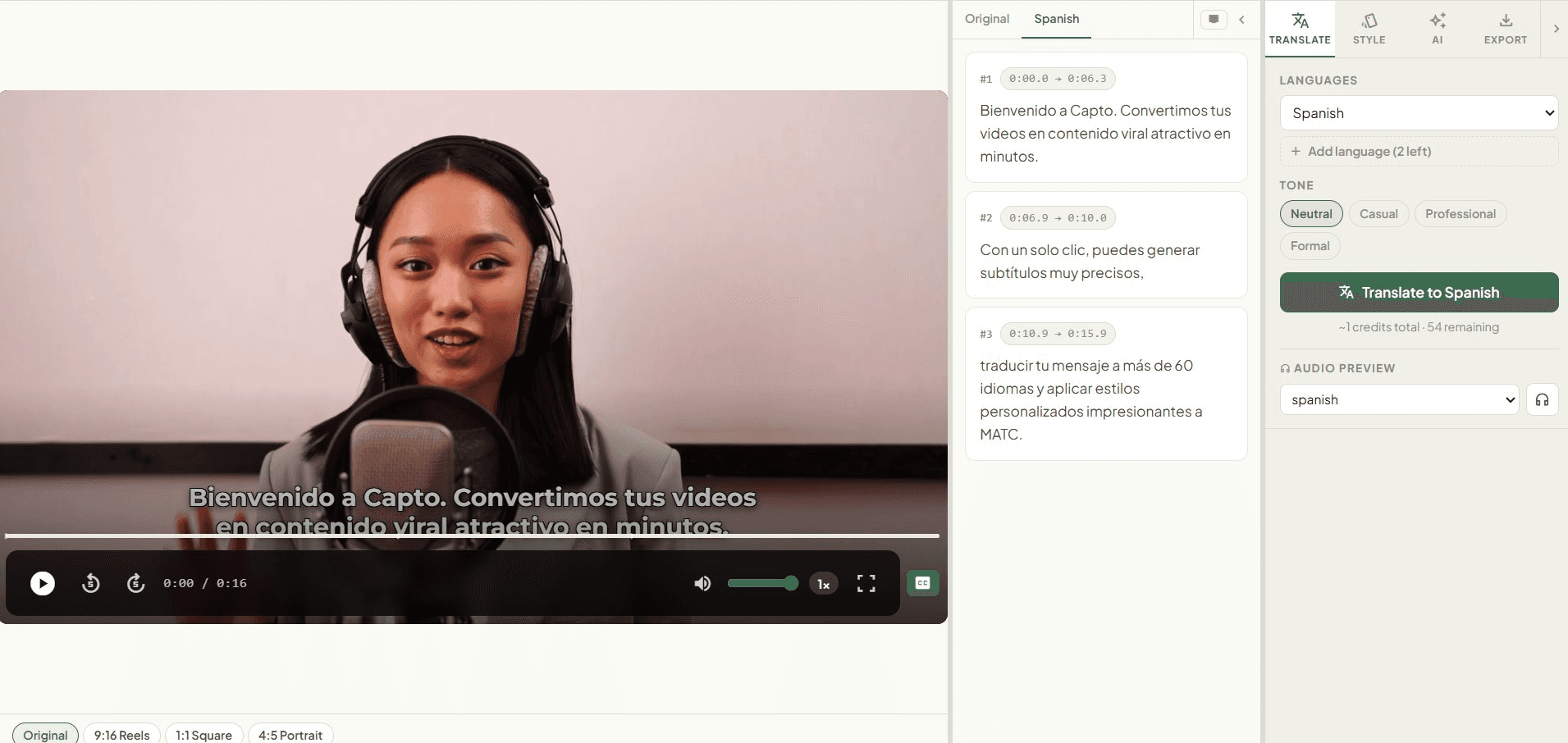
- check_circleTranslate into 60+ languages with 4 AI tone presets
- check_circleDirect burned-in MP4 — skip Premiere Pro and Final Cut
For Podcasters
Turn one episode into a month's worth of shareable content.
- check_circleAI finds your best clips and exports a ready-to-share ZIP
- check_circleSmart speaker diarization — labels every guest automatically
- check_circleInstant show notes, key takeaways & chapter timestamps
Simple by design
From video to subtitles
in 3 simple steps
Want the full walkthrough? Read our guide: How to add subtitles to a YouTube video → · AI video translation →
What our users say
“I subtitle every lecture for my students. Capto cut my prep time from 4 hours to under 10 minutes.”
Dr. Sarah K.
Online Course Educator
“My Reels reach went up 60% after adding captions. The burned-in MP4 is ready for Instagram instantly.”
Marcus T.
Content Creator, 280K followers
“Speaker diarization for our interview podcast is game-changing. So accurate, and the transcript is perfect.”
Priya M.
Host, The Growth Files Podcast
Everything you need
Professional Subtitling, Translation
& Dubbing Features
Auto Language Detection
Automatic video transcription in 100+ spoken languages — no configuration required.
60+ Translation Languages
GPT-4o-mini powered translations in 4 tone presets: Neutral, Casual, Professional, Formal.
Every Export Format & Custom Branding
Download SRT, VTT, TXT, DOCX, or ASS — or export a fully burned-in MP4. Upload custom fonts, add watermarks, and auto-generate emoji overlays for a polished, branded look.
Speaker Diarization
Identify and label multiple speakers — essential for interviews and panel discussions.
AI Video Dubbing & Voiceovers
Generate natural-sounding, translated audio tracks with our advanced Text-to-Speech engine. Export audio-only or as a fully dubbed burned-in video in 60+ languages.
AI Social Clips
AI scans your video and extracts the most engaging moments as viral-ready social clips.
Transparent pricing
Simple, honest pricing.
No surprises.
1 credit = 1 minute of video · credits never expire · pay only for what you use
Essential
Credits never expire · No subscription
- check_circle120 min of transcription
- check_circle60 min of burned-in exports
- check_circle80 min multi-speaker podcast
- check_circleCredits never expire
Creator
Credits never expire · No subscription
- check_circle300 min of transcription
- check_circle150 min of burned-in exports
- check_circle200 min multi-speaker podcast
- check_circleAI Summary + chapter markers
Pro
Credits never expire · No subscription
- check_circle600 min of transcription
- check_circle300 min of burned-in exports
- check_circle400 min multi-speaker podcast
- check_circleAI Social Clips generator
Monthly subscription · auto-renews · cancel any time
Growth
1,200 credits every month
≈ 2.7¢ per credit · credits roll over
Cancel any time · no long-term commitment
How credits work: Transcription 1× · Speaker diarization 1.5× · Burned-in MP4 2× · AI Social Clips 5× · Translation 0.2× per language. No hidden fees.
All plans include auto language detection, 60+ translation languages, and SRT/VTT export.
Questions & Answers
Everything you need
to know
Do credits expire?add
No. Credits never expire — buy a pack today, use it in six months.
Can I dub my video into another language?add
Yes. Capto generates a full AI-voiced dubbed audio track in 60+ languages. You can download the dubbed audio on its own, or export a fully dubbed burned-in video — no separate software needed.
What video formats are supported?add
MP4, MOV, WebM, AVI, and MKV. File size limits are 100 MB (Essential), 500 MB (Creator/Pro), and 2 GB (Growth). Video length limits are 15 min, 60 min, 120 min, and 4 hours respectively.
How accurate is the transcription?add
Whisper consistently achieves 95%+ accuracy for clear audio. You can edit any segment directly in the workspace.
Which languages can I translate my subtitles into?add
Capto translates into 60+ languages including Spanish, French, Japanese, Arabic, German, Portuguese, Hindi, Korean, Italian, Russian, Chinese (Simplified & Traditional), Dutch, Polish, Swedish, Turkish, Greek, and Thai. Each translation costs 0.2× the video duration in credits. Re-exporting the same language later is always free.
Does Capto work for right-to-left languages like Arabic?add
Yes. Capto correctly handles RTL languages including Arabic. The subtitle file (SRT/VTT) will contain correct Unicode text. For burned-in exports, captions are rendered with proper RTL alignment.
Can I try before buying?add
Yes — every new account starts with 5 free minutes. No credit card required.
How long does transcription take?add
Most videos finish in under 2 minutes. Speaker diarization may take up to 4 minutes.
Can I translate into multiple languages?add
Yes. Each translation costs 0.2× the video duration in credits. Repeat exports of the same language are always free.
Not sure which subtitle format to use? Read: SRT vs VTT — which format should you use? →
Share your thoughts
We’d love to hear
from you
Ready to reach every audience — in their language?
Translate into 60+ languages. Start free, no card required.
boltStart Free Today